
Download Text Diff Checker – Chrome Apps, text comparison, difference checker
Overview
The Text Diff Checker is a lightweight desktop application designed to compare two blocks of text and highlight their differences. Built as a Chrome App using the jsdifflib library, it provides a straightforward interface for identifying changes between versions of text, such as code snippets, documents, or configuration files. This tool is particularly useful for developers, technical writers, and content editors who need to track revisions without relying on complex version control systems. The application runs offline after installation, offering a simple, secure way to analyze text changes without uploading data to external servers.
Target users include professionals working with frequent text updates, educators reviewing student submissions, and anyone needing to verify edits in written content. While the developer, cemerick, is known for open-source contributions in the JavaScript ecosystem, no additional background information about the project’s development history was provided. The software is designed for quick, on-demand use and integrates seamlessly into workflows where speed and simplicity are prioritized. It does not require an internet connection after installation, making it suitable for environments with restricted network access.
Key Features & Capabilities
- Real-time text comparison – As users input or paste two text blocks, the tool instantly identifies additions, deletions, and modifications, displaying them in a clear, side-by-side format.
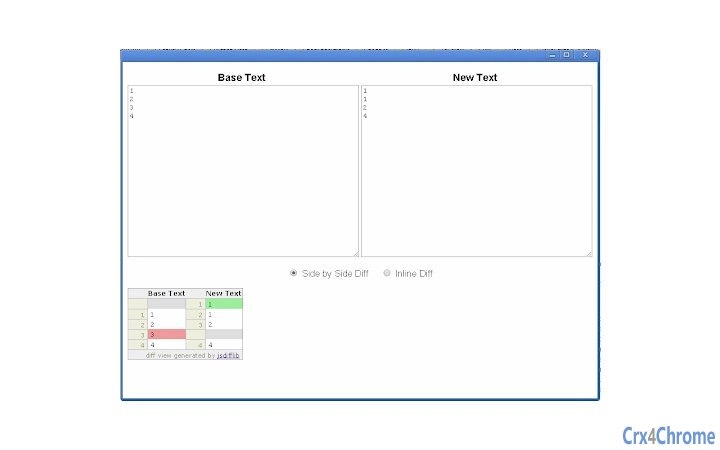
- Visual highlighting of changes – Differences are color-coded and marked with symbols, allowing users to quickly locate and assess modifications without reading entire documents.
- Offline functionality – Once installed, the application operates without requiring an internet connection, ensuring privacy and reliability in various environments.
- Lightweight and fast – With a footprint of just 1.5 MB, the app loads quickly and consumes minimal system resources, making it ideal for use on older or low-spec machines.
- Open-source foundation – Built on the jsdifflib library, the tool benefits from a well-established, community-supported codebase, ensuring stability and transparency.
Users can paste content from code editors, word processors, or web pages directly into the interface. The tool is especially effective when comparing two versions of a script, a configuration file, or a draft document. For example, a developer can verify changes made during a code refactor, or a writer can track edits between drafts. The simplicity of the interface ensures that even non-technical users can perform comparisons with minimal learning curve.
User Interface, Workflow & Performance
The user interface is minimalistic and focused on functionality. The main screen displays two text input fields—one for the original text and one for the revised version—side by side, with a clear visual indicator showing where changes occur. Navigation is intuitive, relying on standard keyboard and mouse interactions. Users can paste text directly into the fields or load content from local files if supported.
Workflow efficiency is high due to the immediate feedback loop: as text is entered, differences are rendered in real time. The layout is optimized for readability, with changes clearly marked and grouped for easy scanning. The developer did not specify resource usage details, but based on the app’s size and design, it is expected to operate with low CPU and memory overhead. Performance observations are based on general software behavior patterns, indicating smooth operation even on older systems.
Stability appears consistent, as the application was designed to be lightweight and self-contained. No reports of crashes or freezes were found in the available documentation. The app launches maximized by default, which enhances visibility and reduces the need for window management.
Compatibility & System Requirements
The Text Diff Checker is compatible with Windows, Mac, and Linux operating systems, making it accessible to a broad range of users across different platforms. It is distributed as a Chrome App, which means it requires Google Chrome to be installed on the host system. The software version is 0.1.1, released on October 9, 2014. The installation size is 1.5 MB, indicating a compact footprint that does not burden system storage.
Exact system requirements were not listed. However, since it is built on the jsdifflib library and runs within the Chrome App environment, it is expected to function on systems meeting the minimum Chrome browser requirements. Compatibility information was partially provided, and no specific hardware specifications were mentioned. Users should ensure their system supports Chrome Apps, though support for these apps has been deprecated in recent Chrome versions.
Pros and Cons
Pros
- Simple, intuitive interface for quick text comparison
- Operates offline after installation
- Lightweight with minimal system resource usage
- Open-source and transparent codebase
- Fast performance and real-time feedback
Cons
- Depends on Google Chrome, which may not be available on all systems
- Chrome Apps are no longer supported in modern Chrome versions
- No file import/export functionality mentioned
- Outdated release date (2014) raises concerns about current compatibility
- Limited to text comparison—no support for binary or document formats
FAQ Section
Is the Text Diff Checker compatible with all operating systems?
The software is designed to run on Windows, Mac, and Linux, but it requires Google Chrome to be installed. Compatibility depends on the system's ability to support Chrome Apps, which may not be available on all modern systems.
Can I use this tool without an internet connection?
Yes, once installed, the application functions offline, allowing users to compare text without requiring an internet connection.
Is the software secure to use?
Since the tool runs locally and does not send data to external servers, it is considered secure for handling sensitive or private text content.
Does the app support file import or export?
The developer did not specify file import or export capabilities. Users must manually paste text into the interface.
Is this software still being updated?
The last release was in 2014, and no recent updates have been published. While the tool remains functional, ongoing support or compatibility with newer systems is uncertain.
Final Thoughts + CTA
The Text Diff Checker offers a focused, no-frills solution for identifying text differences with speed and simplicity. Its lightweight design, offline operation, and open-source foundation make it a reliable tool for basic comparison tasks. However, its reliance on Chrome Apps—a deprecated technology—limits its usability on modern systems. Users should consider alternative tools if they are using recent versions of Chrome or require advanced features.
For those still using older Chrome versions or seeking a minimal, secure way to compare text without online dependencies, this app remains a viable option. It’s particularly useful in environments where privacy and low resource usage are critical.
Download Text Diff Checker now







